Optimizing iPhone Pro Max for Professional Mobile Media Workflows
The iPhone Pro Max as Your Portable Media Studio
For creative professionals on the go, the iPhone Pro Max has evolved into far more than just a communication device. Its expansive display, formidable processing power, and advanced camera systems position it as a truly capable platform for mobile photography and video editing workflows. This isn't about casual edits; it's about leveraging the Pro Max for demanding tasks, from capturing high-quality footage and RAW images to performing intricate edits and final exports, all within a compact, portable form factor.
Editor's pick: iPhone Pro Max cases & grips on Amazon → As an Amazon Associate, this site earns from qualifying purchases.
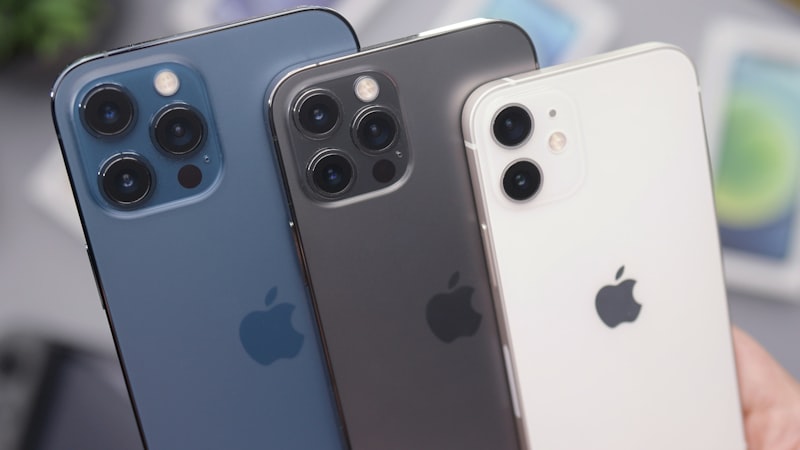
The integration of powerful A-series chips, coupled with the generous screen real estate, fundamentally transforms how media professionals can operate outside of a traditional desktop environment. It's about maintaining productivity and creative control, whether you're on location, commuting, or simply prefer the flexibility of a touch-first interface for certain tasks.
The Pro Max Display Advantage for Precision Editing
The defining characteristic of the iPhone Pro Max for media editing is undoubtedly its large Super Retina XDR display. This isn't merely about size; it's about the canvas it provides for detailed work. Cropping, masking, applying local adjustments, or fine-tuning sliders in a photo editor becomes significantly more precise and comfortable on a screen of this magnitude. Users can see more of their timeline in video editors, inspect image details without constant zooming, and navigate complex interfaces with greater ease.
Furthermore, the display's ProMotion technology ensures incredibly fluid scrolling and responsiveness, which is critical when scrubbing through video timelines or making rapid adjustments. As we've explored in our analysis of display technology at iPhone View, the high brightness and exceptional color accuracy of the Pro Max screen are also paramount. These attributes allow for critical review of colors and tones, ensuring that what you see on your device closely matches the final output, a crucial factor for professional-grade content.
Unleashing Processing Power for Demanding Tasks
Beneath the stunning display lies the true engine of the Pro Max's media capabilities: the A-series Bionic chip. These chips are not merely fast; they are engineered for sustained, high-performance tasks. This translates directly into real-world benefits for photographers and videographers:
- Real-time 4K Video Editing: The ability to edit multiple tracks of 4K video, apply complex effects, and perform color grading without significant lag or dropped frames is a game-changer for mobile videographers.
- RAW Photo Processing: Working with large RAW image files, applying intricate adjustments, and exporting high-resolution results is handled with remarkable speed, allowing photographers to maximize the data captured by their iPhone's advanced camera system.
- Complex Graphics and Layering: Apps supporting multi-layered image editing or intricate graphic design can run smoothly, enabling more sophisticated creative work on the go.
This raw processing power means less time waiting and more time creating, making the Pro Max a genuine tool for professional output, even when tackling projects traditionally reserved for desktop workstations.
Key Applications for Professional Workflows
The App Store offers a robust ecosystem of applications that harness the Pro Max's capabilities:
- Video Editing:
- LumaFusion: Often considered the gold standard for mobile video editing, LumaFusion offers multi-track editing, a comprehensive suite of effects, color correction tools, and advanced audio mixing, all optimized for the large iPhone screen.
- DaVinci Resolve for iPad/iPhone: Bringing a professional-grade desktop editing suite to iOS, DaVinci Resolve offers unparalleled color grading, editing, and audio post-production features, making the Pro Max a formidable portable editing station.
- Photo Editing:
- Adobe Lightroom Mobile: Essential for RAW photo editing, offering powerful organizational tools, cloud sync, and a familiar interface for photographers.
- Affinity Photo 2: A comprehensive photo editor that rivals desktop applications, providing layer-based editing, advanced selection tools, and support for a wide range of file formats, making complex composites and retouching possible.
- Darkroom: Known for its intuitive interface and powerful editing tools, Darkroom excels at batch processing and offers a streamlined workflow for photographers needing quick, high-quality results.
Workflow Tips and Best Practices
To truly unlock the Pro Max's potential, consider these workflow enhancements:
- Efficient File Management: Utilize the Files app to organize your media. For large projects, consider offloading footage or images directly to external SSDs via USB-C, or leveraging iCloud Drive for seamless synchronization across devices.
- Color Management: Take advantage of the Pro Max's color-accurate display for critical grading decisions. When possible, export in industry-standard color spaces.
- External Accessories (Strategic Use): While the iPhone is central, accessories like a stable tripod for capture, or a USB-C hub for connecting an external SSD and charging simultaneously, can enhance productivity.
- Battery Optimization: Demanding media tasks consume significant power. Ensure your device is adequately charged, or consider a portable power bank for extended editing sessions. Adjusting background app refresh and display brightness can also help prolong battery life during critical work.
Conclusion: The Pro Max as a Versatile Creative Powerhouse
The iPhone Pro Max has cemented its position as a serious tool for professional mobile media workflows. Its combination of a vast, color-accurate ProMotion display, desktop-class processing power, and a rich ecosystem of sophisticated applications allows photographers and videographers to capture, edit, and deliver high-quality content without being tethered to a traditional studio. For those who value portability without compromising on capability, the Pro Max offers an increasingly compelling proposition, blurring the lines between what's possible on a phone and what's expected from a dedicated workstation.